Separate The Investment Case
Fiber laser ROI is a cash-flow case before it is a calculator result. Keep the vendor quote, financing terms, production case, operating cost, and approval rule in separate rows so a manager can challenge the assumption that moved the payback month.
Use the investment ledger before entering numbers:
| Ledger line | What to collect | Strongest record | Modeling check |
|---|---|---|---|
| Installed cost | Machine, options, delivery, installation, training, and facility work. | Current vendor quote and written installation scope. | The configured machine matches the jobs in the production case. |
| Financing | Down payment, financed amount, rate, term, payment timing, and fees. | Lender term sheet or internal finance policy. | Debt service stays outside monthly operating cost. |
| Production case | Monthly units, sale value, ramp timing, utilization plan, and demand source. | Won quotes, purchase orders, outsourcing invoices, backlog, or reviewed RFQs. | The model does not treat theoretical capacity as booked work. |
| Operating cost | Power, gas, labor, maintenance, consumables, overhead, and service policy. | Hourly-rate model, utility bills, supplier invoices, service documents, and logs. | Recurring cost is included once and assigned to the right model line. |
| Decision rule | Analysis horizon, discount rate, downside case, cash-reserve threshold, and approval threshold. | Accounting policy, finance review, or written management threshold. | The rule is written before the favorable scenario is selected. |
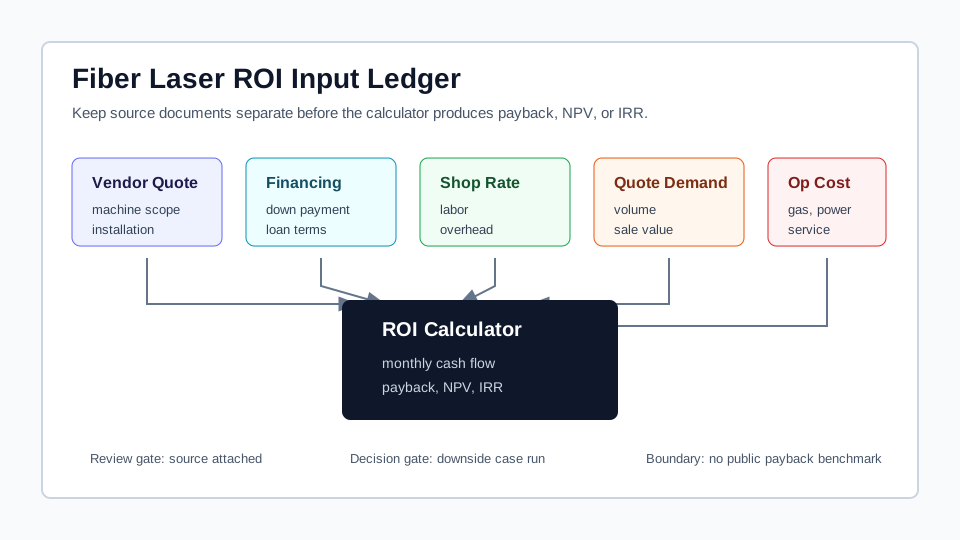
Purchase scope, financing, shop rate, demand, and operating cost should enter the ROI model as distinct review lines.
Match The Calculator Semantics
The ROI calculator uses a financed cash-flow model. That means the purchase does not enter every metric in the same way.
Total investment = equipment cost + installation cost
Down payment = total investment x down payment percent
Financed amount = total investment - down payment
Monthly revenue = monthly production x price per unit
Monthly profit = adjusted revenue - monthly operating cost - monthly debt payment
When the finance rate is zero, the monthly debt payment is the financed amount divided by the number of payments. When the finance rate is positive, the monthly payment uses the standard loan factor:
monthly payment = principal x (r x (1 + r)^n) / ((1 + r)^n - 1)
In that expression, r is the monthly finance rate and n is the payment
count. The calculator starts the payback, NPV, and IRR cash-flow series with the down payment
because financed principal is paid through monthly debt service. Simple ROI and cumulative ROI
still use total investment as the denominator, so a financed case is not treated as if the machine
only cost the down payment.
Payback is the first month where cumulative cash flow reaches break-even. If that does not happen inside the analysis horizon, record the result as payback not reached inside the analysis horizon. Do not convert a missing break-even month into a zero-year payback.
NPV discounts each monthly profit by the selected discount rate. IRR estimates the return rate that makes NPV equal zero, but unusual cash-flow patterns can make IRR noisy. Use it with NPV, payback, and downside cash flow, not as the only approval rule.
Build The Revenue Bridge
Fiber laser payback can come from new revenue, avoided outsourcing, lead-time control, or a combination. Write the bridge before calculating so the same job does not appear as two benefits.
| Benefit source | How to model it | Evidence to attach | Double-count risk |
|---|---|---|---|
| New quoted work | Use planned monthly units and sale value. | Won quotes, active RFQs, repeat-customer demand, and capacity review. | Using machine capacity as if it were contracted demand. |
| Avoided outsourcing | Convert current supplier spend into an in-house scenario. | Supplier invoices, lead-time records, rework records, and delivery requirements. | Counting outsourced savings and the same customer revenue separately. |
| Lead-time control | Record it as a strategic or capacity reason unless it creates measurable revenue or avoided cost. | Late orders, expedite cost, customer commitments, and schedule constraints. | Forcing every operational benefit into monthly revenue. |
If a purchase case uses both new work and replaced outsourcing, identify the jobs in each lane. The bridge should make clear which work creates customer revenue, which work replaces supplier spend, and which work is only a scheduling or strategic reason.
Trace One Financed Case
The numbers below are a calculation trace, not a public payback benchmark. They show how the model flows so an estimator can replace every line with a vendor quote, lender term sheet, shop records, and quote history.
| Line | Illustrative case | Trace |
|---|---|---|
| Total investment | 200,000 from equipment and installation inputs | Used as the denominator for ROI metrics. |
| Down payment | 50,000 | The cash-flow series starts at -50,000. |
| Financed amount | 150,000 | Paid through monthly debt service, not added again to monthly operating cost. |
| Loan terms | 60 payments at 7.2% annual finance rate | The loan factor produces about 2,984 per month. |
| Monthly revenue | 28 jobs x 1,100 sale value = 30,800 | The production case must come from reviewed demand, not rated machine capacity. |
| Monthly operating cost | 18,000 before debt service | Built from hourly rate, maintenance, energy, gas, labor, and overhead records. |
| First-month modeled profit | 30,800 - 18,000 - 2,984 = 9,816 | This monthly profit is added to the starting down-payment cash outflow. |
| Break-even trace | After five months the cumulative cash flow is still negative; month six turns positive. | The payback result comes from cumulative monthly cash flow, not from annual ROI. |
The trace is deliberately incomplete as a purchase decision. It does not validate tax treatment, resale value, incentives, operator staffing, installation risk, customer churn, or financing fees. Those items should be added only when the shop has evidence for the specific case.
Test Downside, Base, And Upside Lanes
A single fiber laser ROI case is fragile. Build at least three lanes and keep the input that changed visible.
| Lane | Question it answers | Inputs to change | Decision use |
|---|---|---|---|
| Downside | Can the shop carry the machine if ramp-up is slower than planned? | Lower monthly units, delayed sales conversion, higher service allowance, or higher finance cost. | Debt-service and cash-reserve review. |
| Base | Does the purchase work under reviewed planning assumptions? | Vendor quote, lender terms, shop rate, documented demand, and operating-cost plan. | Main management discussion. |
| Upside | What happens if the machine absorbs more demand or replaces more outsourced work? | Higher monthly units, stronger mix, lower supplier spend, or better utilization. | Capacity and staffing planning, not automatic approval. |
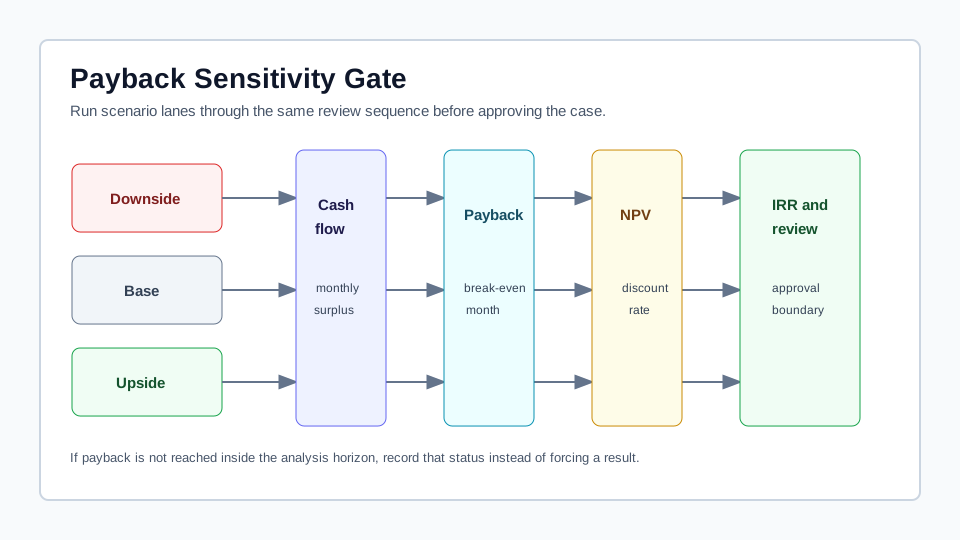
The useful sequence is cash flow first, payback second, NPV and IRR third, then the shop's written approval rule.
Transfer Operating Cost Once
The ROI calculator asks for monthly operating cost. Build that value from the same records used by the hourly-rate and quote workflow:
- Use the machine cost worksheet to capture purchase scope, installation, and financing assumptions.
- Use the hourly rate builder to convert machine ownership, labor, maintenance, power, gas, consumables, and overhead into a cost floor.
- Use the operating cost guide to separate maintenance, service contracts, consumables, downtime, travel, and exclusions.
- Use the energy calculator when electricity cost is material enough to review as its own line.
- Use the laser cutting calculator to test whether real jobs support the volume and sale-value assumptions.
The boundary is debt service. The ROI model calculates monthly loan payment from the finance inputs. Do not also hide that payment inside monthly operating cost.
Use The Strongest Records
Use evidence in this order:
- Completed jobs, quote history, purchase orders, outsourcing invoices, machine logs, and schedule records from the shop.
- Current vendor quotes, warranty scope, installation scope, support scope, and lender terms.
- Internal accounting policy, finance policy, productive-hour policy, discount-rate choice, and advisor-reviewed tax assumptions.
- LaserCalc Pro outputs derived from user-entered assumptions.
- RFQs, booked work, outsourcing invoices, and reviewed production cases that support the volume and sale-value assumptions.
No public payback benchmark is assumed. Buyer interest does not prove revenue; use booked work, RFQs, outsourcing invoices, and reviewed production cases before treating demand as a cash-flow input.
What Inputs Move The Payback Month?
Installed cost, down payment, financing rate, loan term, monthly units, sale value, monthly operating cost, growth assumptions, analysis horizon, and discount rate all affect the result. The lines that usually deserve the strongest records are demand, sale value, recurring operating cost, and debt service.
Can New Revenue And Outsourcing Savings Be Used Together?
Yes, but only when the bridge separates the work. New customer work belongs in revenue. Replaced outsourced work belongs in the change from supplier spend to in-house cost. If the same part file appears in both lanes, the case is overstated.
Move The Reviewed Case Into The Calculator
Run the ROI calculator after the ledger is reviewed. Keep contract language, tax treatment, incentives, depreciation policy, and final capital approval with the appropriate advisor or management review. LaserCalc Pro structures the case and runs the formulas; it does not approve the purchase.