Measure Load Before Pricing Energy
Laser cutter power consumption should be calculated from electrical load and time, not from rated laser output alone. Output power, nameplate values, wall power, auxiliary equipment, idle load, and job-level electricity cost are different things.
Use OEM data, utility bills, existing submeters, or qualified electrical review for electrical inputs. Do not treat this article as instruction to open panels, install meters, or inspect live electrical equipment without the right personnel.
Use this job-level structure:
Job kWh = cutting load kW x cutting hours + auxiliary load kW x job hours + idle load kW x non-cutting hours
The load buckets must be mutually exclusive before this formula is used. Choose either separate state loads, where cutting, auxiliary, and idle draw are measured without overlap, or a total-state load, where one measured job load already includes the support equipment. Do not add auxiliary or idle load again when it is already inside the cutting or total-state measurement.
For a job-level worksheet, convert that energy into a cost line with the billing rule that the shop actually uses:
Electricity cost = job kWh x utility rate + allocated demand charge
Variable definitions:
| Variable | Meaning | Source preference |
|---|---|---|
| Cutting load kW | Measured or documented electrical draw during active cutting. | Submeter, OEM documentation, controller data, or qualified review. |
| Cutting hours | Active cut time for the same job scope used in the quote. | Cycle-time calculation, CAM estimate, controller log, or timed sample. |
| Auxiliary load kW | Chiller, compressor, nitrogen generation, dust collection, exhaust, or automation included in scope. | Measured draw, nameplate, vendor documentation, or facility submeter. |
| Job hours | Total elapsed time assigned to the auxiliary equipment for this job scope. | Cycle-time model, production log, or reviewed shop allocation policy. |
| Non-cutting hours | Setup, standby, warmup, or idle time assigned to this job. | Production log, setup record, or documented shop policy. |
| Allocated demand charge | Demand-cost share applied by written shop policy. | Utility bill, tariff sheet, accounting policy, and reviewer approval. |
If your shop already includes power in the hourly rate, do not add the same power again as a direct job line. Use the calculation to check whether the hourly-rate energy assumption is still reasonable.
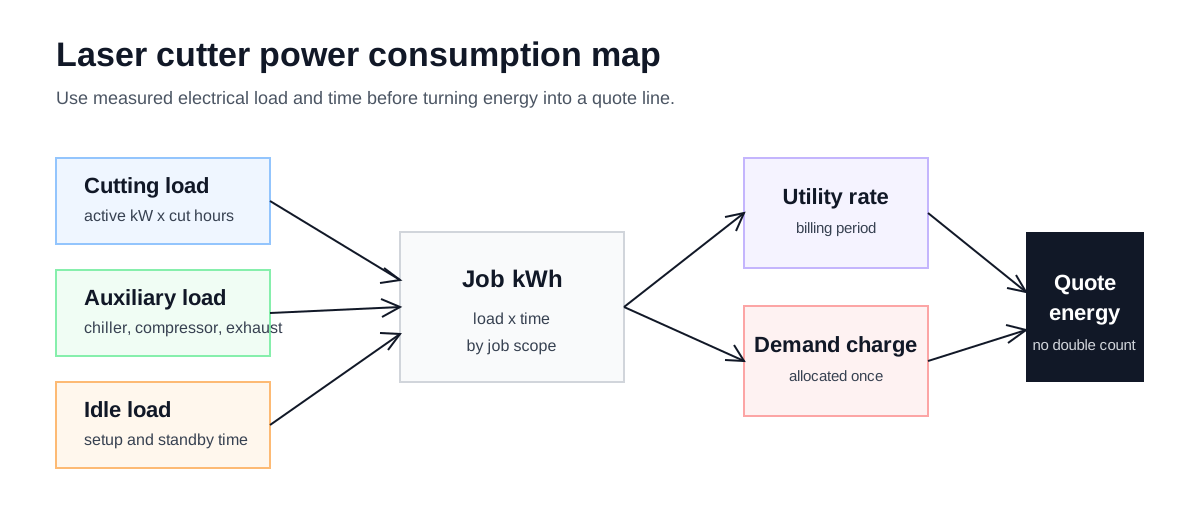
Job energy cost starts with measured electrical load, then moves through time, tariffs, and allocation policy before it enters the quote.
Estimator Scenario
Use this guide when energy needs to be visible in the quote review instead of buried in a shop-rate assumption. That can happen when the estimator is checking the machine cost floor, comparing auxiliary equipment assumptions, or explaining why a long low-labor job still carries facility energy cost.
The first question is scope. Decide whether the quote includes only the laser cabinet, the chiller, compressor or nitrogen generation, exhaust, dust collection, automation, standby time, and any demand-charge policy. The second question is placement: is that power already inside the hourly rate, or is it a separate job line?
Separate The Loads
The power model should not treat the laser source as the whole machine. A shop may need to account for chiller load, compressor or nitrogen generation, exhaust, dust collection, automation, standby state, and facility-level demand charges.
Choose the tool by scope:
| Surface | Use it for | Decision it should not replace |
|---|---|---|
| This power guide | Deciding the kWh method and double-counting boundary. | Electrical measurement or facility safety review. |
| Energy calculator | Modeling operating-period load, utility rate, power factor, and cost assumptions. | A finished job-kWh import, demand-charge allocation, or hourly-rate placement decision. |
| Power reference | Recording source types for power-consumption assumptions. | Job-specific measured load and billing-period review. |
| Input | Why it matters | Preferred evidence | Quote decision |
|---|---|---|---|
| Cutting load | The machine draws different power during active cutting than during standby. | metered kW, OEM electrical documentation, controller data | Use with cutting hours when creating a direct job energy line. |
| Auxiliary load | Chiller, compressor, dust collection, exhaust, and automation can belong to the job. | equipment nameplates, measured draw, utility submetering | Include only the auxiliary equipment assigned to this job scope. |
| Job time | Energy depends on cutting time, setup time, and non-cutting machine time. | cycle-time calculator, controller logs, timed setup records | Use the same job hours used by the time and quote calculators. |
| Utility rate | Tariffs, time-of-use rules, and demand charges change the cost basis. | utility bill, tariff sheet, accounting policy | Use the same billing period used in the shop-rate review. |
The minimum input set for a job-level review is measured cutting kW, cutting hours, auxiliary kW, idle or setup load, utility rate, and the shop's demand-charge allocation rule.
Load Placement Ledger
Power consumption becomes a quoting problem when the same load can appear in more than one cost place. Use this ledger to decide whether a load belongs in the hourly rate, a direct job line, or a review note.
| Load line | Measure or document | Place in quote model | Boundary check |
|---|---|---|---|
| Laser cabinet and source | Active cutting kW for the same process family. | Hourly-rate energy bucket or direct job kWh line. | Do not confuse rated laser output with wall power. |
| Chiller and cooling | Measured draw, nameplate, or OEM documentation plus assigned job hours. | Auxiliary load when the job consumes the operating period. | Do not also absorb the same chiller energy in facility overhead. |
| Compressor or nitrogen generation | Equipment scope, operating time, and whether it serves multiple machines. | Direct job line only when allocation is written and source-backed. | Do not mix gas cost and generation electricity without showing both lines. |
| Dust collection and exhaust | Assigned load and whether it runs for setup, cutting, or the full shift. | Auxiliary load, facility load, or overhead policy. | Use one placement for normal production load. |
| Standby and warmup | Non-cutting hours assigned to the job or shift policy. | Idle load line or hourly-rate assumption. | The same standby time must not be counted in both setup and energy. |
| Demand charge | Billing period, peak demand source, and allocation rule. | Overhead, hourly rate, or direct job allocation. | Leave it out of the direct line until the allocation rule is written. |
Decide Where Power Belongs
There are three practical ways to carry power cost into a quote:
- Include normal energy inside the shop hourly rate.
- Add a direct energy line for each job.
- Use a hybrid model where normal energy is in the hourly rate and unusual auxiliary load is reviewed separately.
Any method can work if it is documented and not double-counted. The problem is using one energy value in the hourly rate and then adding the same consumption again as a job surcharge.
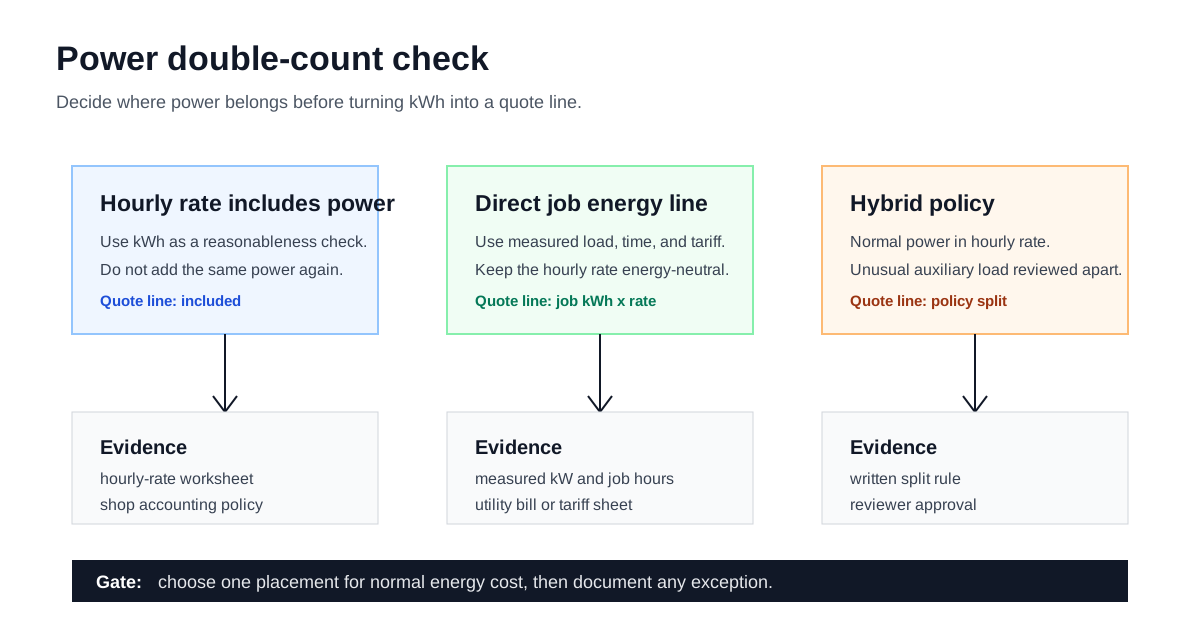
The energy line is ready only after the estimator can show whether power is inside the hourly rate, outside as a direct job line, or split by policy.
Transfer kWh Into A Quote Line
Calculate job kWh directly in the worksheet. The energy calculator is still useful when the estimator needs an operating-period review from rated power, average load, auxiliary equipment, hours, utility rate, and power factor. Keep the transfer boundary visible: it does not replace a written demand-charge allocation rule, and it should not be treated as a separate import field for a finished job-kWh number.
Power factor matters when converting apparent power in kVA into real kW. If the source is already measured real kW, it already reflects that electrical relationship and should not receive another power-factor adjustment.
For a job-level energy line, the estimator should record the scope:
| Record line | What to capture | Reviewer check |
|---|---|---|
| Load source | Metered kW, OEM data, nameplate, or reviewed placeholder. | The source is safe to use and not confused with rated laser output. |
| Auxiliary scope | Included chiller, compressor, nitrogen generator, exhaust, dust collection, or automation. | Only equipment assigned to this job scope is included. |
| Billing period | Utility bill or tariff period used for the rate. | The period matches the shop-rate or overhead review. |
| Double-count check | Hourly-rate included, direct line, or hybrid policy. | Normal energy cost appears once. |
| Reviewer | Person and date for the power-cost treatment. | Demand-charge or hybrid rules have approval. |
If measured data is missing, label the value as a planning placeholder and replace it before quoting production work. A public page should not turn rated output power into a universal electricity cost claim.
Worked Case
Use one case to check whether the energy line belongs inside the hourly rate or as a direct job line. The values below are illustrative worksheet placeholders, not measured shop data, a utility tariff, or a public power-consumption benchmark. Replace them with the shop's measured records and billing currency before quoting.
| Case line | Example case | Why it matters |
|---|---|---|
| Cutting load | 9.6 kW | Illustrative value; replace with measured draw while active cutting. |
| Cutting time | 0.75 h | Same job scope as the quote. |
| Auxiliary load | 2.4 kW | Chiller and exhaust assigned to the job. |
| Job hours | 1.3 h | Includes setup and standby assigned to this job. |
| Idle load | 0.9 kW | Non-cutting load for warmup or standby. |
| Non-cutting hours | 0.55 h | Only the hours that belong to the job. |
| Utility rate | 0.18 billing-currency units per kWh | Illustrative rate; replace with the shop's billing period and currency. |
Example job kWh = 9.6 x 0.75 + 2.4 x 1.3 + 0.9 x 0.55 = 10.815 kWh
Example electricity cost = 10.815 x 0.18 + allocated demand charge
That case is useful when the estimator needs to check that power is counted once and that the rate uses measured load instead of nameplate output.
Demand Charge Gate
Demand charges need a separate decision because they are not the same as ordinary kWh cost. If the shop allocates a demand charge to jobs, the worksheet should show the rule and period. If demand charges stay in overhead or the hourly rate, the job-level energy line should not add them again.
Use a written rule:
- billing period reviewed;
- measured or billed peak demand used;
- allocation basis selected by the shop;
- jobs included or excluded;
- reviewer approval when the rule changes.
If that rule is not available, leave demand charge outside the direct job energy line and keep the assumption visible.
Review Checks
Before using the number in a quote, confirm:
- cutting time and setup time use the same job scope;
- auxiliary equipment belongs to this job or to the whole shop;
- utility rate matches the billing period and location;
- demand charges are allocated once or excluded consistently;
- the hourly rate does not already include the same energy cost.
What The Energy Model Does Not Decide
Use utility bills, tariff sheets, metered kW, OEM electrical documentation, equipment nameplates, controller logs, electrician review, and completed-job records. This article is a job-level kWh worksheet; the energy calculator supports operating-period reviews, so keep the period and allocation basis visible when moving between them. Do not convert rated laser output into a public electricity cost benchmark.
Carry The Energy Assumption Into The Rate
Use the energy calculator for operating-period energy assumptions, then compare the load source against the power consumption reference. If a reviewed job-kWh line changes the machine cost floor, review the fiber laser operating cost per hour guide and update the hourly rate builder inputs.