Make Indirect Cost Visible
Overhead allocation assigns indirect shop cost to a laser cutting job before margin. The purpose is not to make the quote look more sophisticated. The purpose is to stop rent, supervision, maintenance support, software, insurance, facility cost, and production support from disappearing inside a flat markup.
The allocator uses one basic structure:
Allocated overhead = total overhead pool x job basis / total basis
The selected basis must use the same period and unit logic for the pool, the total basis, and the job line. A monthly overhead pool should not be divided by annual available hours and then applied to cutting-only minutes without a written conversion.
Moving the result into the laser cutting calculator needs one more check: the overhead allocator produces allocated overhead dollars for a job, while the laser calculator field is an overhead rate as a percent of direct modeled cost. Convert or review the dollar result before entering it:
overhead rate percent for laser quote = allocated overhead / direct modeled cost x 100
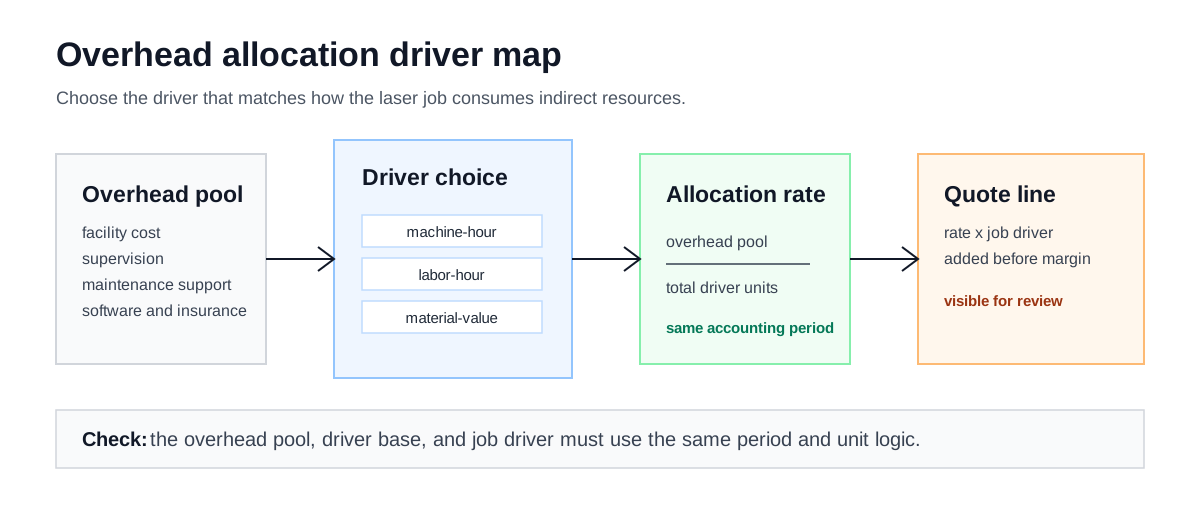
Overhead should move from a defined pool, through a matching driver, into the quote before margin is applied.
Choose The Driver
Use this guide when two laser jobs look similar on direct cost but consume the shop differently. One job may occupy the machine for a long unattended cut. Another may require repeated loading, inspection, programming changes, and customer-owned material control. A third may be short on machine time but heavy on material purchasing and storage.
The overhead allocation calculator supports these driver choices:
| Method | Use when | Driver basis | Review warning |
|---|---|---|---|
| Machine hours | The laser, chiller, extraction, and support equipment are the constrained resources. | Job machine hours / total machine hours. | Do not mix available hours in the total basis with cutting-only hours on the job. |
| Labor hours | Handling, programming, inspection, finishing, or supervision drives the job. | Job labor hours / total labor hours. | Do not omit programming or inspection time if those costs are inside the pool. |
| Material cost | Purchasing, carrying cost, scrap exposure, or material handling dominates. | Job material cost / total material cost. | Customer-owned material needs its own policy before this driver is used. |
| Floor space | Storage, staging, fixtures, or long dwell time are the cost behavior being modeled. | Job floor-space units / total floor-space units. | The unit must describe the period, not just the physical footprint. |
| Equal split | The shop intentionally spreads a reviewed pool evenly across a small set of comparable jobs. | Total overhead / job count. | Avoid equal split when job size or resource consumption varies materially. |
Match Period, Pool, And Basis
Before using the rate, check that the overhead pool period and driver-base period match. If the pool is monthly, the total basis should be monthly. If the driver base is available machine hours, the job basis should also be machine hours under the same definition.
Use a record that is more specific than a notes field:
| Record line | What to write | Reviewer check |
|---|---|---|
| Pool period | Month, quarter, or policy period used for the overhead pool. | The total basis comes from the same period. |
| Included costs | Facility, supervision, maintenance support, software, insurance, or other reviewed costs. | Direct labor, direct material, and margin are not mixed into the pool. |
| Total basis | Total machine hours, labor hours, material cost, floor-space units, or job count. | The job basis uses the same unit definition. |
| Quote line | Allocated overhead amount and where it enters the cost stack. | Margin is applied after overhead, not used as a substitute for it. |
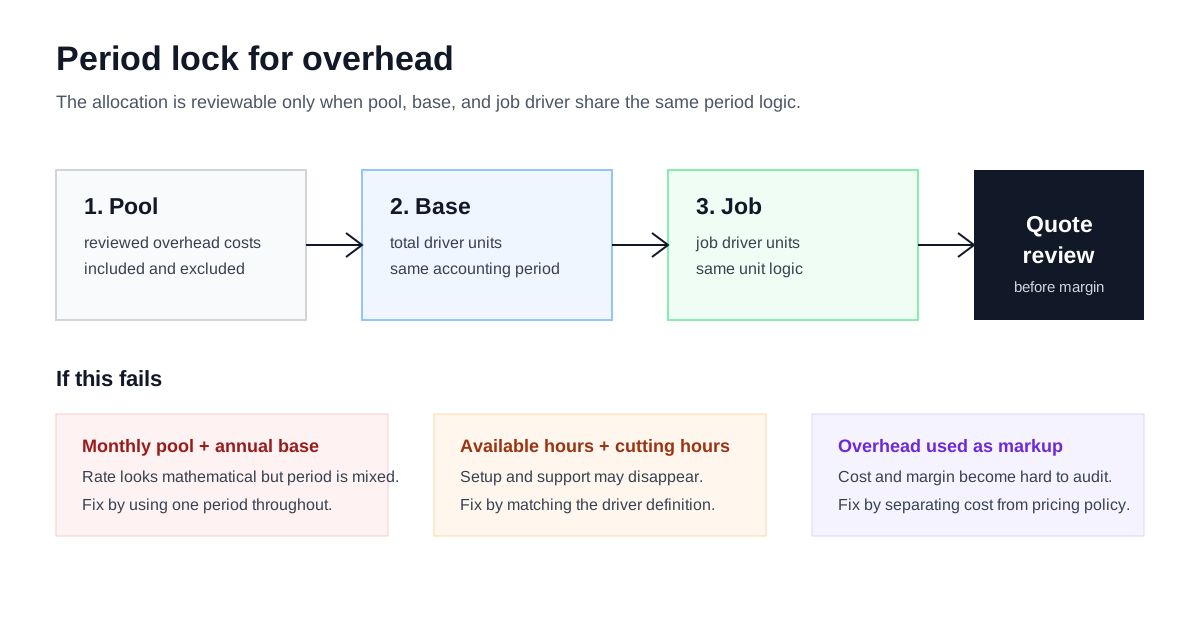
Period matching is the hidden quality check: the pool, total basis, and job basis must use the same unit logic.
Trace One Allocation
Use the trace below to check the algebra before running a live job. The values are placeholders for structure, not overhead benchmarks.
| Line | Illustrative record | Formula role |
|---|---|---|
| Overhead pool | Reviewed indirect cost for the selected period. | This is the numerator shared by the jobs in the pool. |
| Total basis | Total machine hours, labor hours, material cost, floor-space units, or job count for that period. | This is the denominator used to create the allocation share. |
| Job basis | The job's machine hours, labor hours, material cost, floor-space units, or one equal-share count. | This is the share applied to the selected job. |
| Allocated overhead | total overhead pool x job basis / total basis | This amount enters the quote before target margin. |
| Laser quote field | allocated overhead / direct modeled cost x 100 | This conversion is needed when the receiving calculator expects an overhead percent. |
If the trace cannot be explained in those terms, the quote is using markup language rather than allocation language. Keep the margin decision separate from the overhead decision.
Keep Separate Pools Separate
Some shops use more than one overhead pool. Facility and maintenance support may follow machine hours, while programming support follows labor hours. That can be reasonable, but it is a policy review outside the single-method calculator result.
Document each pool separately:
- pool name and period;
- costs included in the pool;
- driver basis and total basis;
- job basis for the quote;
- reason the pool belongs in production overhead instead of direct cost, selling expense, or margin;
- approval record when the method changes.
Do not call a custom multi-pool policy a calculator default. The calculator can test individual methods; the shop's accounting policy decides whether a combined allocation is valid.
Review The Quote Placement
Add overhead after direct cost and before target margin:
- Calculate material, cutting time, pierce time, setup, gas, power, and labor.
- Allocate overhead using the selected driver.
- Check whether the overhead line matches the job behavior.
- Apply target margin to the total cost stack.
That sequence keeps the quote readable. A reviewer can see whether the issue is material, cycle time, setup, gas, overhead, or margin instead of arguing about one unexplained selling price.
Release Checks
Before using the overhead line in a live quote, confirm:
- The overhead pool excludes costs that the shop prices somewhere else.
- The pool period and driver-base period match.
- Setup, programming, inspection, and finishing time are not missing from the chosen driver.
- Customer-owned material has a separate policy if material-value allocation is used.
- Margin is applied after overhead.
- The quote packet names the allocation method so a reviewer can challenge it.
- Allocated overhead dollars have been converted or reviewed before entering a percent-based quote field.
Move Into The Allocator
Use the overhead allocation calculator to test the driver choice. If the shop hourly rate still needs work, start with the hourly cost structure guide. When the overhead line is reviewed, carry it into the laser cutting calculator before margin.