Price Is A Reviewed Commercial Decision
The laser engraving price calculator turns an internal cost floor into a modeled selling price. The result is still a release candidate until the estimator has checked the cost record, the approved gross-margin policy, the quoted quantity, and the work included in the customer scope.
The live tool remains at Laser Engraving Price Calculator. This page explains how to inspect the result and keep the price trace attached to the quote.
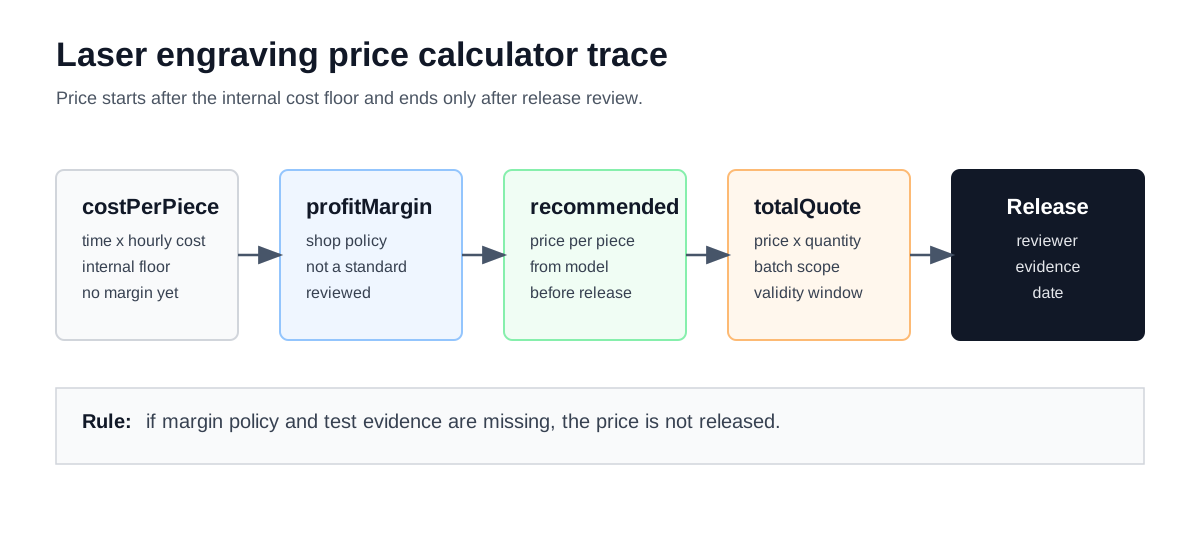
Price review begins with a cost record, applies the shop's margin policy, and stops at a documented release decision.
Read The Output Fields Correctly
The result panel contains several different kinds of numbers. Keep the name and meaning of each one intact when the result is copied into a worksheet or quote packet.
| Calculator field | Meaning in the review | Evidence to attach |
|---|---|---|
costPerPiece | Modeled internal processing cost for one part before margin and excluded adders. | Cost stack, timed sample mark, controller record, and hourly-rate worksheet. |
profitMargin | Gross margin used by the current calculator formula before release. | Approved shop pricing policy and the person authorized to release the quote. |
recommendedPrice | Modeled selling price per piece after the margin assumption is applied. | Quote scope, revision, quantity, and review note. |
totalQuote | Modeled price per piece multiplied by quantity, before separate adders or commercial terms. | Quoted quantity, validity window, included operations, and exclusions. |
revenuePerHour | Modeled revenue rate if the reviewed time and price hold for the batch. | Cycle-time record and capacity review; it is not a utilization guarantee. |
utilizationRate | Marking-time share of the modeled per-piece time, not whole-machine utilization. | Marking time and setup allowance used in the same calculator run. |
totalQuote is therefore a modeled subtotal, not automatically the final customer total. Use a
separate line for any blank, fixture, artwork, inspection, packaging, freight, scrap, minimum
charge, or other approved scope item.
Gross Margin Is Not Markup
The current price formula uses gross margin:
recommendedPrice = costPerPiece / (1 - profitMarginDecimal)
totalQuoteBeforeAdders = recommendedPrice x quantity
piecesPerHour = 3600 / totalTimePerPieceSec
revenuePerHour = piecesPerHour x recommendedPrice
markingTimeShare = markingTimePerPieceSec / totalTimePerPieceSec x 100
The current calculator initializes profitMargin to 35% for its internal model. This is an
implementation value, not a market price, external percentage, or released shop rule. Enter the
shop-approved margin in the worksheet or replace the calculator assumption before a quote is
released. A 35% gross margin is not the same as adding 35% to cost.
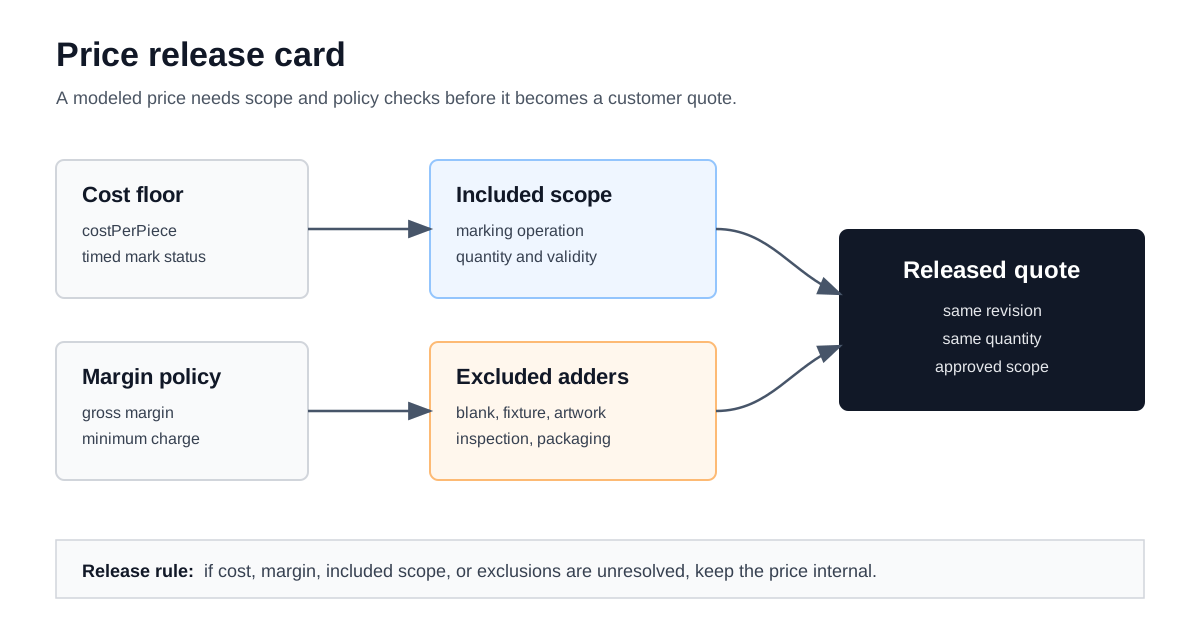
A price can be mathematically complete and still commercially incomplete when scope, evidence, or margin approval is missing.
A Worked Price Trace
This is a calculation exercise that uses the illustrative cost trace from the engraving cost guide. The figures show the arithmetic only; they are not a price recommendation for a material, region, or shop.
| Step | Illustrative value | Review meaning |
|---|---|---|
| Internal cost floor | $0.9343 per piece | Comes from the modeled 111.6 seconds/piece and $30.13/hour cost stack. |
| Margin used for the exercise | 35% gross margin | Shown to demonstrate the formula; replace it with the approved shop policy. |
| Modeled price per piece | $1.4373 | $0.9343 / (1 - 0.35). |
| Quantity | 100 pieces | Must match the setup allocation and the customer scope. |
| Modeled subtotal before adders | $143.73 | $1.4373 x 100; it is not the final quote when other operations are excluded. |
The trace is useful because it isolates the reason for a price change. A longer accepted mark changes the cost floor. A different margin policy changes the price while leaving the cost floor unchanged. A fixture or inspection requirement changes the quote scope and may need a separate line rather than a hidden percentage.
Check Margin Sensitivity Without Calling It A Market Table
When the cost floor is fixed, the margin formula can be reviewed with a small sensitivity table. This table is another arithmetic exercise using the unrounded model value behind the illustrative $0.9343 cost per piece and 100 pieces.
| Gross margin entered | Modeled price per piece | Modeled subtotal before adders |
|---|---|---|
| 20% | $1.1678 | $116.78 |
| 35% | $1.4373 | $143.73 |
| 45% | $1.6987 | $169.87 |
The table is not a recommendation to use any of these percentages. It shows why the margin should be stored as a policy input and why the estimator should not confuse a modeled result with an external pricing claim.
Confirm What The Price Includes
Before release, mark every operation as included, separate, or excluded. This is where a clean calculator result becomes a quote that another person can understand.
| Scope item | Question to answer | Possible quote treatment |
|---|---|---|
| Blank or substrate | Is the customer supplying the part, or is the shop buying it? | Separate material line, included cost, or customer-supplied exclusion. |
| Fixture and loading | Does the batch need masking, a jig, orientation checks, or repeated handling? | Setup line, allocated setup cost, or documented exclusion. |
| Artwork and serialization | Is the file ready, or does the shop need cleanup, numbering, or programming? | Separate programming line or included operation with a scope note. |
| Inspection and packaging | What acceptance check and packaging method does the customer require? | Handling/inspection line, packaging line, or explicit exclusion. |
| Minimum charge and validity | Does the shop policy impose a minimum or a time limit on the price? | Approved commercial term attached to the released quote. |
Do not use the margin input to hide a missing operation. Margin compensates for the relationship between cost and selling price; it does not identify an unrecorded fixture, blank, inspection step, or customer requirement.
Keep A Release Record
Attach the evidence that lets another estimator reproduce the price without guessing:
- The artwork or drawing revision and material/method selection.
- The timed sample mark, controller record, or clearly labeled planning status.
- The cost floor and the hourly-cost inputs used in that calculator run.
- The approved gross-margin policy and any minimum-charge rule.
- Quantity, included operations, exclusions, validity window, and release date.
- The person authorized to approve the commercial quote.
The quote packet does not need to expose confidential customer information on a public page. It does need to preserve enough internal context that a later revision can be compared with the released scope.
Hold The Price When Evidence Is Missing
Keep the modeled price internal when:
- the cost floor still uses untested planning speed or setup values;
- the material, method, artwork detail, or quality target has no matching sample;
- the 35% calculator margin is being treated as approved shop policy without review;
- a fixture, blank, artwork, inspection, packaging, or scrap item is missing from scope;
- the quantity in the quote does not match the setup allocation;
- the modeled subtotal is being presented as the final customer total.
What Changes The Price First?
The first review should identify the field that moved: time, hourly cost, margin, quantity, or scope. Re-running the calculator without recording that change makes the result harder to audit.
Is The Calculator Margin A Public Pricing Rule?
No. The current 35% value exists to demonstrate the gross-margin formula in the tool. It should be replaced or approved by the shop's own pricing policy before use in a customer quote.
Send A Reviewed Price Into The Quote
Build the cost floor in the laser engraving cost calculator guide, run the live laser engraving price calculator, and review the shop hourly rate calculator when the hourly-cost inputs change. Keep the released price attached to the same artwork revision, quantity, and scope that was reviewed.