Cost Starts With A Time Record
Laser engraving cost per piece is the modeled processing time plus allocated setup time, multiplied by the shop hourly cost. That result is an internal cost floor. It does not become a customer price until margin, quote scope, and any excluded blank, fixture, inspection, artwork, or packaging costs have been reviewed.
This page is for the cost floor only. The companion laser engraving price review handles margin and quote release.
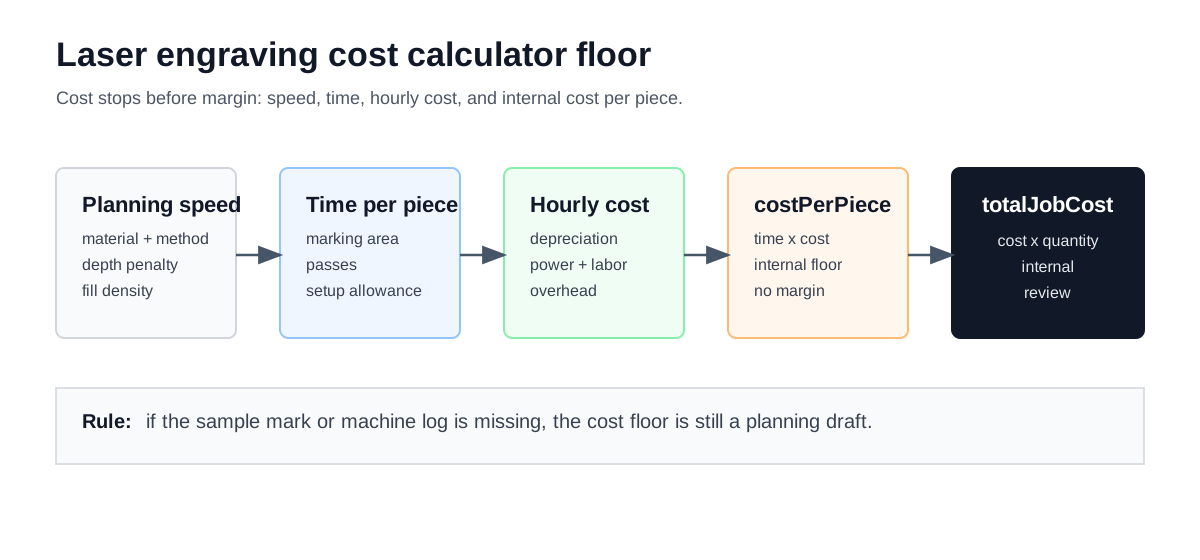
The cost floor joins a time record to an hourly-cost record. Margin is deliberately outside this calculation.
Record The Inputs Before Calculating
The current marking calculator has enough fields to expose the main time and hourly-cost drivers, but each value still needs a unit and a source. A planning value is acceptable for an early pass only when it is marked for later replacement.
| Input group | Calculator fields and units | Record to keep | Planning boundary |
|---|---|---|---|
| Mark geometry |
| Artwork revision, accepted sample mark, fill pattern, hatch direction, and controller record. | Area alone does not describe photo detail, small text, QR correction level, or cosmetic acceptance. |
| Batch handling | quantity as pieces; setup allowance is derived as seconds/piece | Fixture note, loading method, first-piece timing, inspection step, and quoted quantity. | The tool uses a quantity rule for setup allocation; it is not a measured setup record. |
| Machine ownership |
| Purchase record, ownership policy, planned productive hours, and review date. | Depreciation is an allocation model, not an accounting opinion for every shop. |
| Hourly cost |
| Hourly-rate worksheet, service records, payroll policy, and overhead allocation policy. | Do not add a cost here again if the same line is already inside the reviewed shop rate. |
| Energy planning input | laserPowerWatts in W; electricityRatePerKwh in currency/kWh | Utility bill, approved tariff, measured machine draw, or a documented planning assumption. | The current model does not separately capture chiller, extraction, compressor, or facility auxiliary loads. |
The first four rows are the minimum record for a cost-floor review. If the job includes blank material, a fixture, artwork preparation, inspection, packaging, or scrap, keep those items outside the current result until the quote policy says where they belong.
Trace Time And Hourly Cost
The calculator derives time from area, a material/method lookup, depth, fill density, and passes. It then adds a quantity-based setup allowance:
baseSpeedMm2PerSec = planning speed for material and marking method
adjustedSpeedMm2PerSec = base speed x 0.7^markingDepth x (10 / fillDensity)
markingTimePerPieceSec = markingAreaMm2 / adjustedSpeedMm2PerSec x passes
totalTimePerPieceSec = markingTimePerPieceSec + setupTimePerPieceSec
The setup rule currently used by the calculator is:
| Quoted quantity | Modeled setup allowance | What must replace it for release |
|---|---|---|
| 1-10 pieces | 12 seconds per piece | A timed loading, fixture, first-piece, and inspection record for the short run. |
| 11-100 pieces | 8 seconds per piece | The same record, allocated across the quantity in the quote. |
| 101 pieces or more | 5 seconds per piece | Batch timing that shows the actual setup and handling pattern. |
These are implementation rules in the current calculator, not production measurements or validated setup rules. They are useful for seeing how batch size changes the model; they should be replaced with a completed-job record when the result is used for release pricing.
Hourly cost is calculated separately:
depreciationPerHour = equipmentCost / (equipmentLifespanYears x annualWorkingHours)
electricityPerHour = (laserPowerWatts / 1000) x electricityRatePerKwh / stepped planning factor
totalHourlyCost = depreciationPerHour + electricityPerHour + laborRatePerHour + overheadRatePerHour + maintenanceRatePerHour
costPerPiece = totalTimePerPieceSec / 3600 x totalHourlyCost
totalJobCost = costPerPiece x quantity
In the code, the speed table is a planning lookup and the depth factor is a simplified
exponential penalty. The power factor is also a stepped planning lookup; it is not a measured
electrical-to-optical efficiency test. laserPowerWatts is a calculator input, not a substitute
for a measured wall-power record. Keep total machine draw and auxiliary loads in the separate
laser cutter power consumption guide unless the hourly
cost policy explicitly accounts for them.
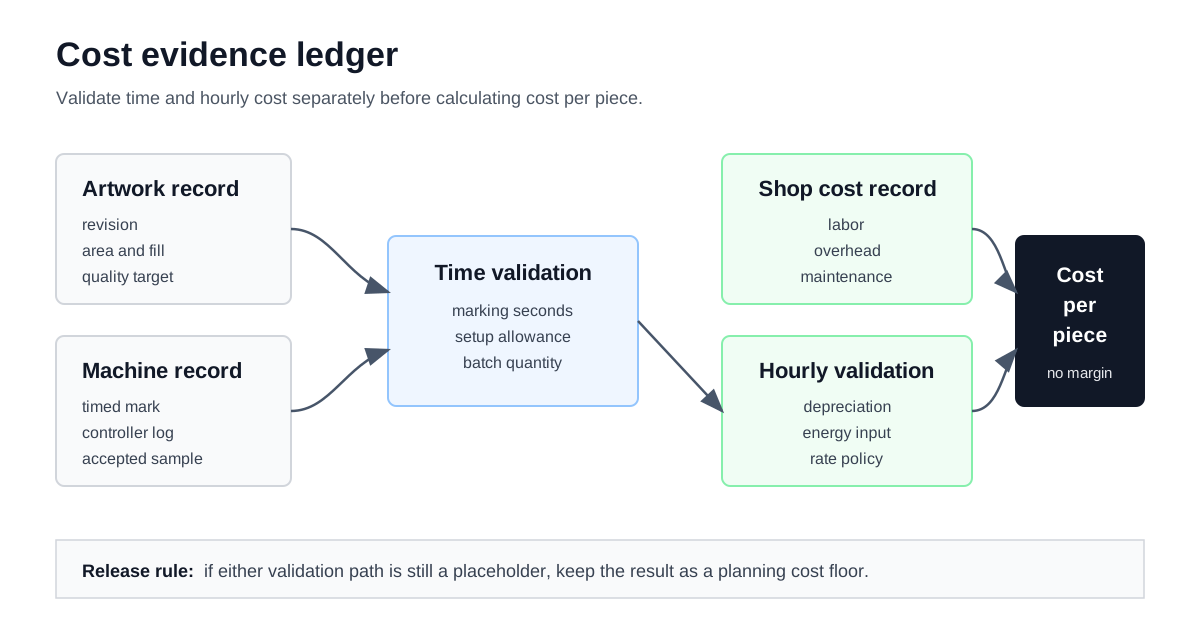
A quote-grade review needs two checks: the artwork and machine record must support the time input, and the shop records must support the hourly-cost input.
A Worked Calculation Trace
The following worksheet is an arithmetic exercise, not a rate recommendation. Every value is shown so another estimator can reproduce the result, then replace the inputs with the records for the actual job.
| Input or output | Illustrative value | Calculation note |
|---|---|---|
| Material and method | Stainless steel engraving | The current planning lookup returns 25 mm²/s before adjustments. |
| Area, depth, fill, passes | 2,500 mm²; 0.1 mm; 10 lines/mm; 1 pass | The depth and fill factors reduce the planning speed to about 24.1 mm²/s. |
| Marking time | About 103.6 seconds/piece | 2,500 / 24.1 x 1. |
| Quantity and setup | 100 pieces; 8 seconds/piece | The current quantity rule selects the middle setup allocation. |
| Total time | About 111.6 seconds/piece | 103.6 + 8.0; the batch is about 3 hours 6 minutes before other operations. |
| Hourly cost | About $30.13/hour | Illustrative ownership, electricity, labor, overhead, and maintenance inputs are summed. |
| Internal cost floor | About $0.9343/piece; $93.43/job | 111.6 seconds / 3,600 x $30.13/hour, then multiplied by 100 pieces. |
The trace exposes where a later review should focus. If the timed mark is longer than the model, the time record changes first. If the shop rate changes, the cost changes without changing the artwork calculation. If a blank, fixture, inspection, or packaging item is absent, it must be added according to the quote policy rather than hidden inside the speed table.
Keep The Cost And Price Boundaries Visible
| Cost-floor line | Why it belongs here | Price-review transfer |
|---|---|---|
| Planning and adjusted speed | They explain how the time model was formed. | Carry the reviewed time into the price calculation after a sample mark or log check. |
| Setup allocation | It distributes batch handling across the quoted quantity. | Check whether the quote needs a separate setup line or a minimum charge. |
| Total hourly cost | It represents the shop's internal cost basis. | Apply the approved gross-margin policy only after excluded costs are identified. |
| Cost per piece and job cost | They are internal outputs before margin and commercial terms. | Move them to the price review guide for release. |
Do not call totalJobCost the final quote. In this model it is the internal processing cost for
the modeled quantity. A customer-facing total may also include blank material, fixture work,
artwork preparation, inspection, packaging, freight, scrap policy, minimum charges, or other
approved adders.
Use Evidence To Replace Planning Values
Use the strongest available record for the specific material, method, artwork, quality target, and machine:
- A completed job record with a timed mark and accepted result.
- A controller or CAM record that matches the same artwork and process.
- A supplier or machine document that is explicitly applicable to the setup.
- A planning placeholder that is labeled before it reaches a customer quote.
The speed table, depth penalty, and stepped power factor do not prove that a job will run at the modeled time or energy cost. They are scaffolding for a transparent first pass. Replace them with measured records when the result matters commercially.
Keep These Items Outside The Current Result
The current marking calculator reports materialCostPerPiece as zero. That is not a claim that
blank material has no cost. It means the current calculator does not have a material-cost field
for the engraving job.
Review these items separately:
- Blank, coating, or substrate cost.
- Fixture, masking, fixturing consumables, and loading aids.
- Artwork cleanup, serialization, file preparation, or programming.
- Inspection, sorting, packaging, and labeling.
- Scrap, rework, rejected marks, and customer-specific acceptance testing.
- Chiller, extraction, compressor, or facility energy when they are not already inside the shop hourly rate.
Do Not Carry A Draft Into Pricing
Keep the cost floor in planning review when:
- the material and marking method combination is unsupported;
- the artwork is photo-based, micro-text, or dense QR work without a matching sample;
- the speed table has not been checked against a timed mark;
- setup or handling is being hidden inside area or speed;
- the hourly-cost records are stale or overlap with direct quote lines;
- excluded items have no documented place in the quote.
What Belongs In Cost Per Piece?
The current model combines modeled marking time, quantity-based setup allocation, depreciation, electricity planning cost, labor, overhead, and maintenance. Blank material, fixtures, artwork preparation, inspection, packaging, and scrap remain outside unless the shop adds them through a separate reviewed line.
Are The Speed Values Production Presets?
No. The material/method values, depth penalty, and stepped power factor are planning assumptions in the current tool. Use timed marks, controller records, and measured energy data to build a shop-specific record before relying on them for production pricing.
Move The Cost Floor Into Pricing
Run the laser engraving calculator, compare the result with the
processing parameters reference, and carry
the reviewed costPerPiece and totalJobCost into the laser engraving price review.