Prepare The File Review
A nesting file sheet cutting workflow is the bridge between a drawing and a material cost assumption. The file needs to be clean enough for CAM review, and the estimator needs to know which sheet, margin, kerf, spacing, rotation, and remnant rules were used before the utilization result enters a quote.
This page covers the file review workflow. The material utilization calculator covers the simplified rectangular math. Keep those roles separate so the guide does not pretend to be CAM software.
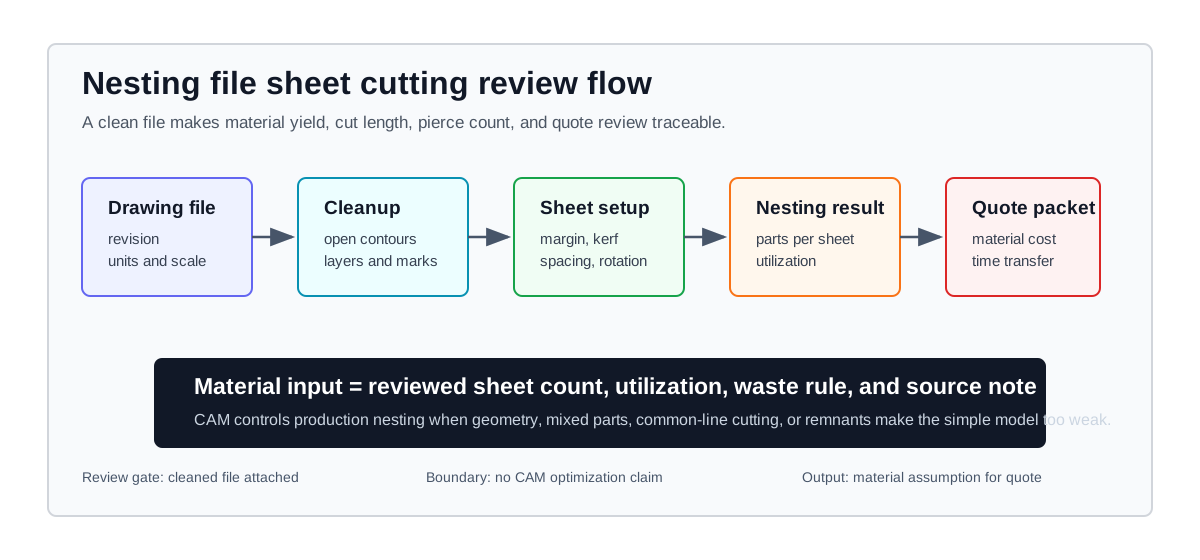
The nesting review starts with file cleanup, then moves through CAM review, sheet assumptions, utilization math, and the final quote packet.
File Review Checklist
Run the file review before calculating material yield. Nesting errors can begin before the formula is applied.
| Review line | What to check | Evidence to keep | Quote risk |
|---|---|---|---|
| Drawing revision | Part number, revision, units, scale, and customer release state. | Quoted drawing, customer file, or internal revision note. | The nest matches an old drawing while sales quotes a newer one. |
| Geometry cleanup | Open contours, duplicate lines, tiny segments, overlapping profiles, and hidden construction geometry. | CAM import report, cleaned DXF, or programmer note. | Extra cut length, failed toolpaths, or missing contours. |
| Contour intent | Exterior cuts, internal holes, engraving, marking, bend lines, and features that should not be cut. | Layer map, color map, or programming convention. | The machine cuts marks as profiles or skips real features. |
| Sheet assumption | Sheet size, grain direction, coating direction, edge margin, clamp zone, and usable stock area. | Stock record, supplier sheet size, remnant tag, or CAM sheet setup. | The utilization number uses material the machine cannot actually reach. |
| Nesting rule | Part spacing, kerf, rotation, common-line policy, tabs, lead-ins, and remnant treatment. | CAM setup, quote note, or approved shop rule. | Material yield and cycle time drift away from the production program. |
File Problems That Change The Quote
The nesting file should expose file problems before the material result enters the quote. A clean matrix makes it easier for estimating, programming, and production to see why a sheet-count or cycle-time assumption changed.
| File issue | What it changes | Quote field at risk | Correction record |
|---|---|---|---|
| Wrong import scale | Part size, cut length, sheet fit, and setup expectation. | Sheet count, utilization, and cycle time. | Record the drawing unit, imported dimension, and corrected file version. |
| Open or duplicate contours | Toolpath validity, pierce count, and unexpected extra cutting. | Cut length, pierce time, scrap risk, and rework review. | Keep the CAM import report or programmer note with the quote packet. |
| Cut and mark layers mixed | Marks can become cuts, or real cuts can be skipped. | Cycle time, quality review, and customer scope. | Store a layer map that separates cut, mark, bend, etch, and no-cut geometry. |
| Unreviewed rotation | Yield may improve while grain, coating, or cosmetic direction fails. | Parts per sheet, remnant value, and customer acceptance risk. | Record the allowed orientation and the reason rotation is limited or approved. |
| Remnant assumption not tagged | Material credit can look real without a usable stock record. | Material cost per part and release confidence. | Attach remnant tag, stock record, or a note that the credit is excluded. |
Planning Formulas
For a rectangular planning check, keep the math explicit:
Available sheet length = sheet length - 2 x edge margin
Available sheet width = sheet width - 2 x edge margin
Effective pitch length = part length + clear spacing + kerf add-on when spacing excludes kerf
Effective pitch width = part width + clear spacing + kerf add-on when spacing excludes kerf
Parts per sheet = rows x columns after rotation rules are applied
Sheets required = required quantity / parts per sheet, rounded-none up
Utilization rate = sellable part area / total sheet area used
Rows are the count of parts that fit along the available sheet length after the selected rotation rule. Columns are the count that fit along the available sheet width. If rotation is allowed, calculate both orientations and keep the orientation that the drawing, grain direction, coating, and CAM review allow. Utilization should state whether it is a full-sheet layout rate or a job-level rate that includes the partially filled last sheet.
Define the spacing field before using it. If the CAM setup already expresses edge-to-edge clearance after kerf compensation, set the kerf add-on to zero. If spacing is only the requested gap between part boundaries, add kerf separately. Apply the edge margin once when calculating usable sheet dimensions; do not subtract it again when calculating utilization.
These formulas are useful for early material planning and worksheet review. They are not a replacement for CAM nesting when the job uses irregular geometry, mixed parts, common-line cutting, tabs, micro-joints, grain restrictions, or remnant strategy.
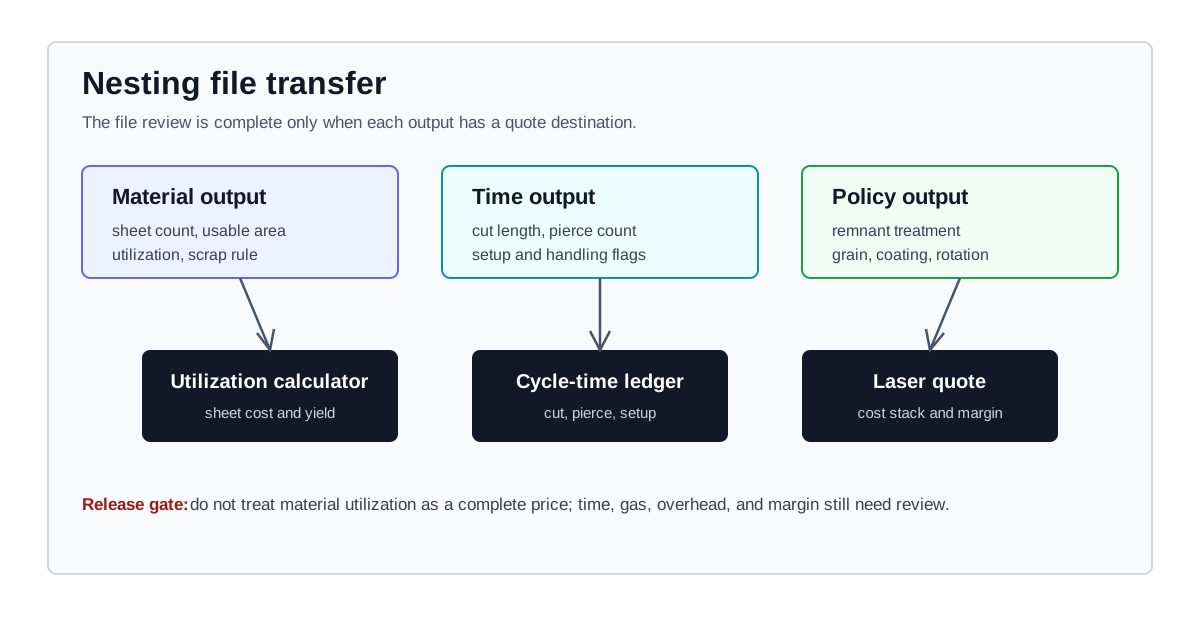
A nesting file is ready for quoting when the material, time, and remnant fields have clear destinations in the quote workflow.
Units And Layers
File problems often hide in units and layers. A drawing that imports at the wrong scale can make every later number wrong, and a layer map that mixes marks with cuts can distort both material yield and cycle time.
Use this unit and layer pass:
- Confirm whether the file is in millimeters, inches, or another drawing unit before importing.
- Check that the part size after import matches the quoted drawing dimension.
- Remove construction lines and geometry that is not intended for the cut program.
- Separate cut, mark, bend, etch, and no-cut layers before measuring toolpath length.
- Record any file cleanup that changes the nesting or cycle-time assumptions.
If the file cleanup changes contour length, pierce count, or part orientation, return to the time model before quoting.
Kerf, Spacing, And Edge Margin
Kerf, spacing, and edge margin should be documented before the material utilization result is trusted. They decide whether the layout is physically possible and whether the quote matches the program.
| Input | Why it matters | Where to validate |
|---|---|---|
| Kerf | Affects cut compensation, fit, spacing, and sometimes part count. | Kerf reference, sample cut, cut chart, or inspection record. |
| Part spacing | Keeps heat, tip-up, and part separation assumptions visible. | CAM setup, shop standard, or programmer review. |
| Edge margin | Protects clamps, sheet edge quality, lead-ins, and handling space. | Machine setup, fixture rule, remnant shape, or operator note. |
| Rotation | Can change yield, grain direction, surface direction, and cosmetic orientation. | Drawing requirement, material note, or customer approval. |
The simplified calculator can test how these inputs change sheet count and cost per part. Production release still belongs to the CAM file and the shop's review process.
Material And Remnant Policy
The material cost line should say which sheet is being used and how remnants are treated. Without that policy, two estimators can quote the same file with different material assumptions and both numbers can look reasonable.
Capture these fields beside the nesting file:
- Stock type, grade, thickness, sheet size, supplier quote, and lot constraint.
- Whether the job uses full sheets, customer material, remnant stock, or reserved stock.
- Whether remnant value is credited, tagged for later use, or treated as scrap.
- Whether skeleton disposal, film removal, or protective coating changes handling time.
- Whether grain, brush direction, coating, or cosmetic face limits rotation.
If remnant reuse is uncertain, do not let a theoretical scrap credit make the quote look cleaner than it is. Record the material policy and require shop approval for disputed values.
When The Calculator Is Enough
The nesting calculator is useful when the estimator needs a fast, transparent material planning check. It works best when the job can be approximated with rectangular parts, known sheet dimensions, clear spacing, fixed margins, and a simple rotation rule.
Use it for:
- Early quote review before a programmer builds the final CAM file.
- Comparing sheet sizes or orientation rules for a simple part family.
- Building a worksheet record that explains sheet count and cost per part.
- Checking whether the material assumption is strong enough to continue the quote.
When the calculator result looks sensitive to spacing, rotation, or margin changes, treat that sensitivity as a review signal. It does not prove the best production nest.
When CAM Controls Production Nesting
Professional CAM controls production nesting when the file includes irregular profiles, mixed part families, shared cuts, common-line logic, remnant selection, tabs, micro-joints, lead-in constraints, sequence risk, or collision risk.
In that case, the estimator should ask for:
- CAM sheet count and utilization.
- Cut length and pierce count from the programmed file.
- A note on rotation, grain, surface direction, and remnant policy.
- Setup or handling assumptions that differ from the simple worksheet.
- Any file issue that must be approved before quote release.
Carry the CAM-reviewed material result into the laser cutting calculator, then use the cycle time guide to keep time assumptions separate from material yield.
Release Gate
Before the file is used for a quote, confirm:
- The cleaned file matches the quoted revision and units.
- No construction geometry, duplicate lines, open contours, or no-cut layers are being treated as cut paths.
- Kerf, spacing, edge margin, and rotation are documented.
- Sheet size, remnant policy, and material source are visible.
- CAM output has reviewed cut length, pierce count, sheet count, and any special handling.
- The material utilization result is carried as a quote input, not as a complete price.
What The Nesting Model Does Not Decide
LaserCalc Pro can structure the review and run a simplified material utilization model. It does not claim to optimize production nests, choose CAM settings, or guarantee material savings. Use shop CAM output, supplier records, remnant tags, machine setup notes, and completed-job reviews before turning the file into a production quote.
Carry The Nesting Result Into The Quote
Clean the file and document the nesting assumptions first. Then run the material utilization calculator, check kerf with the kerf reference, and send the reviewed material input into the full laser quote.