Build The Time Ledger
A laser cutting cycle time calculation should expose every minute that enters the quote. Cutting feed alone is not enough. The estimator needs the toolpath length, approved feed rate, pierce routine, setup work, handling, inspection, and the evidence behind each line.
Use this structure before sending time into the quote:
Cutting minutes = cutting length / approved feed rate
Pierce minutes = pierce count x seconds per pierce / 60
Cycle minutes = setup + cutting + pierce + handling + inspection where applicable
Those formulas are only reliable when the units and sources are locked. If the drawing is in millimeters and the feed is in millimeters per second, calculate seconds first, then convert to minutes. If the CAM output gives meters of cut and the feed is meters per minute, keep the metric path intact.
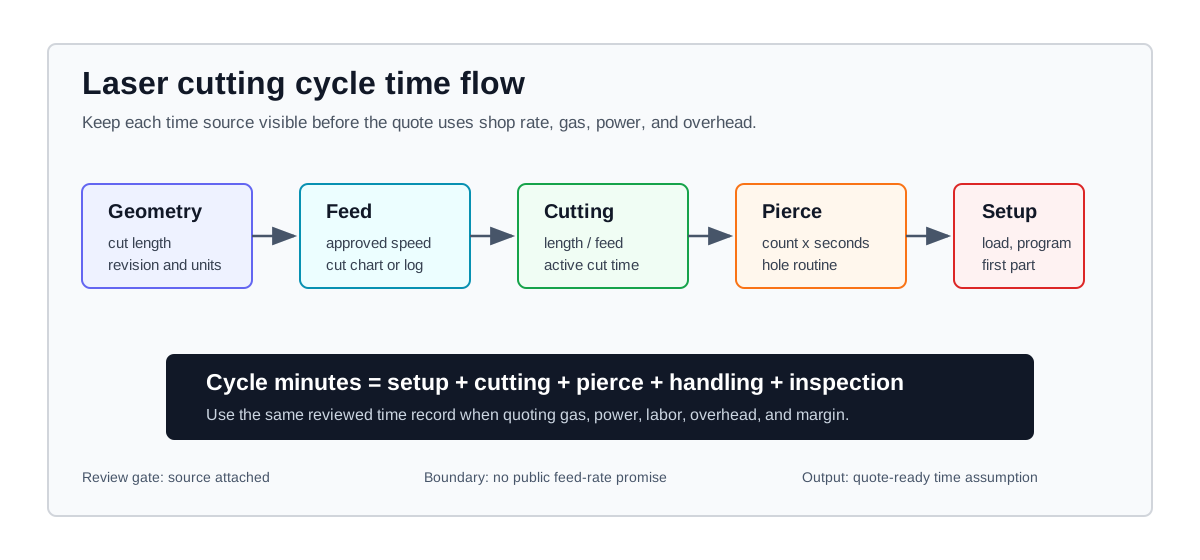
Cycle time is a ledger: geometry and feed create cutting minutes, pierce count adds non-cutting time, and setup or handling keeps the quote from undercounting short runs.
Separate The Time Lines
Keep the calculation in separate rows so another estimator can audit the job without reverse-engineering a single total.
| Time line | Formula or input | Best source | Review risk |
|---|---|---|---|
| Cutting length | Total contour length from the quoted drawing revision. | CAM output, drawing measurement, or controller program. | Old revision, hidden contours, engraving paths, or skipped lines. |
| Feed rate | Approved feed for material, thickness, gas, quality, and machine condition. | Cut chart, controller log, setup sheet, or timed sample. | Borrowed value that does not match the actual cut requirement. |
| Pierce time | Pierce count x seconds per pierce. | CAM contour count, hole review, pierce routine, or sample timing. | Hole-heavy parts looking fast because pierce time was hidden. |
| Setup time | Load, program, nozzle, gas, first article, and job release work. | Shop routing record, operator log, or reviewed setup policy. | Small batches carrying too little non-cutting time. |
| Handling and inspection | Unload, sort, deburr routing, count, inspection, and packing where applicable. | Completed job record or production lead review. | The cutting time is correct, but the quote still misses labor. |
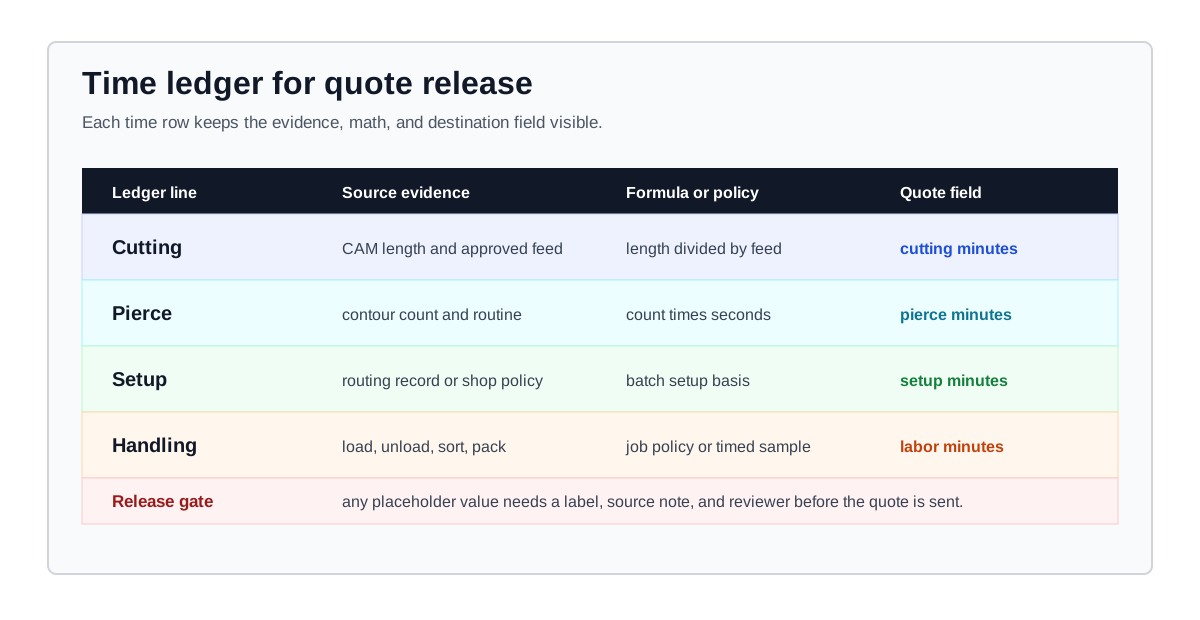
Keep the time ledger audit-ready: each row needs a source, a formula or policy, and the calculator field that receives the value.
Source To Calculator Ledger
Give each source value a clear destination in the calculator before the cycle-time result moves into cost.
| Review input | Normalize before use | Calculator destination | Release check |
|---|---|---|---|
| CAM cut length | Convert drawing units to the feed-rate unit. | Cutting length in the time calculator and full quote. | The measured path belongs to the drawing revision being quoted. |
| Approved feed rate | Keep mm/s, mm/min, m/min, or IPM consistent before calculating minutes. | Effective cutting speed. | The value matches material, thickness, gas, edge quality, and machine condition. |
| Pierce routine | Convert seconds per pierce into minutes after multiplying by pierce count. | Pierce time and pierce cost share. | Internal holes and separately started contours are included. |
| Setup record | Keep total setup minutes separate from per-part time. | Setup minutes and batch allocation. | The setup quantity matches the customer quote quantity. |
| Handling and inspection | Record whether the minutes are job-level, batch-level, or per-part. | Handling, labor, or review note. | The time is not hidden inside a feed-rate shortcut. |
For a clean laser cutting time formula, calculate the cutting line first, then add pierce, setup, handling, and inspection as separate rows. The total is easier to audit than a single blended minutes-per-part assumption.
One-Bucket Rule
Assign every non-cutting activity exactly once before summing the cycle. Mark each item as job-level, batch-level, or per-part, then keep that same level when it enters the quote.
For example, a first-article inspection can be batch-level, while unloading may be per-part. Do not place the same inspection or handling minutes inside both setup and labor. This rule matters most on short runs, where a duplicated time line can materially distort the quote.
Lock Geometry Before Feed
The feed rate should not be chosen until the path is clean. A fast feed estimate on the wrong length makes the cycle result look precise while the source is still unstable.
Run the geometry pass first:
- Confirm the drawing revision and units before measuring.
- Separate exterior profiles, internal holes, etching, marking, and optional contours.
- Check whether the CAM output includes lead-ins, lead-outs, micro-joints, tabs, or test cuts.
- Record whether common-line cutting or shared edges are part of the actual program.
- Keep part quantity and sheet quantity beside the path length so setup is divided across the right batch.
Use the laser cutting time calculator when you need a fast cycle check, then move the reviewed time into the full laser cutting calculator once material, gas, power, overhead, and margin are ready.
Pierce Time Is Not A Rounding Error
Pierce time becomes visible on parts with many holes, tight internal features, thick material, or conservative pierce routines. Treat it as its own line instead of burying it inside cutting speed.
The pierce review should capture:
- Pierce count from CAM or a contour review, not only from visual inspection.
- Seconds per pierce from the active pierce routine for material and thickness.
- Failed-pierce allowance when the shop tracks it internally.
- Whether edge starts, pre-piercing, or alternate geometry are approved for the job.
- Consumable or quality risk when the pierce routine changes.
Use the pierce time estimator when holes dominate the cycle, then return to this time ledger before adding shop rate.
Setup Belongs Outside Pure Cutting
Pure cutting time is not the same as job cycle time. Setup includes the work needed before the first good part and the checks needed before release.
For quote review, keep setup in the same batch context used by the customer price:
| Setup item | Where it comes from | How it enters the quote |
|---|---|---|
| Material load and sheet handling | Operator routine, crane or forklift need, sheet size, and material handling rule. | Setup minutes or handling minutes. |
| Program and parameter confirmation | CAM route, machine setup sheet, gas setup, nozzle, focus, and cut chart. | Setup minutes plus evidence note. |
| First-article inspection | Dimensional requirement, edge requirement, customer tolerance, or internal quality gate. | Setup or inspection minutes. |
| Unload, count, and sort | Batch size, part size, packaging, downstream operation, and counting method. | Handling minutes or labor line. |
If setup is charged separately, document that policy. If setup is spread across the batch, use the same quantity that appears in the customer quote.
Evidence Ladder
Use the strongest available evidence before committing the time model:
- Completed job record from the same machine, material, thickness, gas, and quality requirement.
- Controller log, CAM output, setup sheet, or timed sample cut for the current job family.
- Machine cut chart or supplier-backed process note that matches the actual setup.
- Planning placeholder that is labeled before it reaches a customer-facing quote.
The cutting speed reference can help organize planning values. It should not replace the shop's approved feed, controller log, or sample timing.
Carry Time Into Cost
Time becomes money only after the shop rate and consumables are known. Do not multiply cycle minutes by a selling price before checking what is already included in the hourly rate.
Use this transfer:
Cycle hours = cycle minutes / 60
Time-based cost = cycle hours x reviewed shop hourly rate
Then check whether gas, power, labor, depreciation, maintenance, and overhead are already inside that hourly rate. If they are also added as direct quote lines, the same cost can be counted twice.
The clean path is:
- Build or review the shop hourly rate.
- Confirm material utilization and sheet cost.
- Use this page to review cutting, pierce, setup, and handling time.
- Add gas and power through the related calculators or the full quote form.
- Apply overhead and margin after the cost lines are visible.
Review Gate
Before the cycle-time calculation leaves the estimating desk, check these failure points:
- The cut length came from the drawing revision being quoted.
- Feed rate evidence matches material, thickness, gas, quality, and machine condition.
- Pierce count includes internal holes and any contours that start separately.
- Setup time is either charged separately or spread across the same batch quantity used in the quote.
- Handling, inspection, and packing are not hidden inside an unsupported speed value.
- Time-based cost is not counted once through shop rate and again through separate labor, power, or overhead lines.
What The Time Model Does Not Decide
LaserCalc Pro can structure the time model and run deterministic formulas. It does not publish universal feed rates, machine promises, or cycle-time benchmarks. Use the calculator outputs as a documented assumption record, then replace planning values with machine cut charts, controller logs, CAM output, timed sample cuts, and completed-job reviews before quoting production work.
Carry Reviewed Time Into The Quote
Run the time calculator for the first pass, check feed assumptions with the speed calculator, then carry reviewed time into the full laser quote.